Set Field Name
 This page is applicable only to list and spreadsheet report types.
In the card type of layouts, the field name does not appear in the quick view of the report. However, the detail view of each record carries the field names for the values.
To change the field name:
- Navigate to the Design page.
- Click the Configure Fields for Web button. The Configure Fields window will appear.
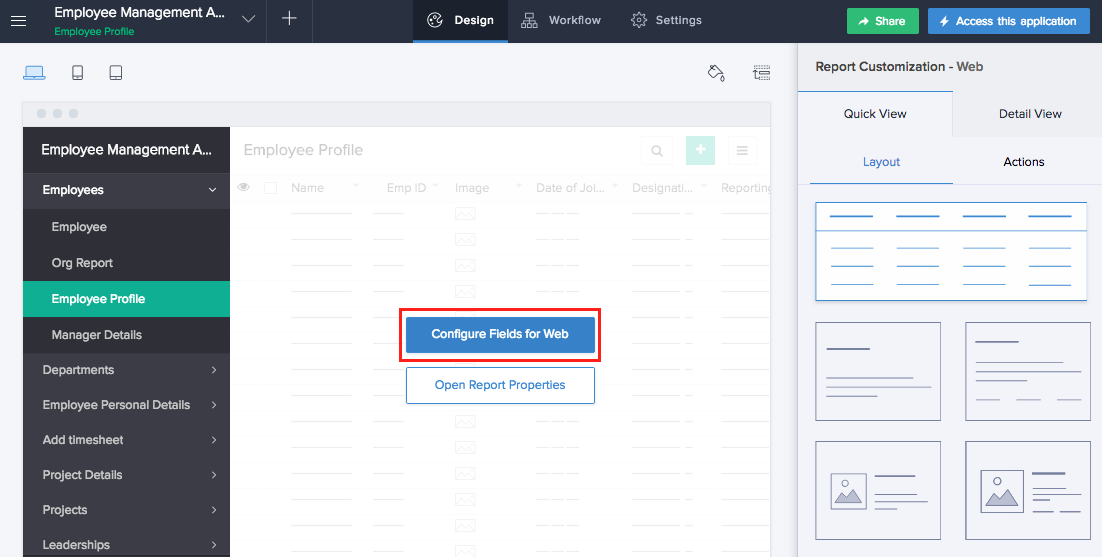
- Select the field that requires a name change.
- Click the current name under Display Name.
- Edit the existing name and enter the required field name.
- Click anywhere or press Enter. The field name is updated.
- Click Close to exit.
Any changes that you make will be saved automatically. The changes are reflected in the preview.
Related Topics
Zoho CRM Training Programs
Learn how to use the best tools for sales force automation and better customer engagement from Zoho's implementation specialists.
Zoho DataPrep Personalized Demo
If you'd like a personalized walk-through of our data preparation tool, please request a demo and we'll be happy to show you how to get the best out of Zoho DataPrep.
- Zoho Workerly Home
- Forums
- Connect With Us:


- Zoho Recruit Home
- Forums
- Connect With Us:
You are currently viewing the help pages of Qntrl’s earlier version. Click here to view our latest version—Qntrl 3.0's help articles.





Zoho Sheet Resources
Zoho Forms Resources
Zoho Sign Resources
Sign, Paperless!
Zoho TeamInbox Resources
Zoho DataPrep Resources
Design. Discuss. Deliver.
Related Articles
Field name & Field link name
Set field name and field link name for form fields Applicable to the following fields: The Field Name property applies to all fields except the add notes field. The Field Link Name property applies to all fields . Ensure to not enter any sensitive ...Field name and field link name
Understand field name and field link name The Field name property is applicable to all fields except the add notes field. The Field link name property is applicable to all fields. Ensure to not enter any sensitive terms while naming you form fields ...Set Image Field Properties
This page is applicable to all report types except pivot chart and pivot table. Select the Image field in the fields section to define properties specific to it. The following steps will help you define the dimensions that the field values will ...Set Lookup Field Properties
This page is applicable to all report types except pivot chart and pivot table. To set properties for lookup field: Edit your app. Navigate to the Design tab. Hover in the middle and click Configure Fields for Web. The Configure Fields window will ...Set Name Field Properties
This page is applicable to all report types except pivot chart and pivot table. Select the name field in the fields section to define properties specific to it. To set name field properties: Navigate to the Design page. Click the Configure Fields for ...