- What is Zoho BugTracker?
- Is Zoho BugTracker reliable and confidential? Is my data safe and secure with Zoho?
- How do I get started with Zoho BugTracker?
- What browsers does Zoho BugTracker support?
- What languages is Zoho BugTracker available in?
- How can I change the Portal URL?
- Is it possible to have multiple administrators for a project?
- Do the archived projects count against my number of project for billing purposes
- How to change my e-mail address in Zoho BugTracker?
- Can I change the portal owner in Zoho BugTracker?
- I was invited to join a portal but could not find the invite mail?
- I got an invite mail but project portal denies access for me?
1. What is Zoho BugTracker?
Zoho BugTracker is a bug tracking software that combines a clean and an intuitive interface to submit and organise issues with customizable workflow, set business rules, create custom views for the issues that software projects are bound to generate and fix bugs fast.
2. Is Zoho BugTracker reliable and confidential? Is my data safe and secure with Zoho?
At ZOHO Corporation, we respect your need for online privacy and protect any Personal Information that you may share with us, in an appropriate manner. As a condition to use of Zoho Services, you consent to the terms of the Privacy Policy Statement as it may be updated from time to time.
In addition we are US/EU Safe Harbour Compliant.
Zoho takes the security of your data and information very seriously. We have taken many different steps to help ensure the safety of your data. This includes physical security practices (like 7x24x365 security, video monitoring, biometric access, bullet-resistant walls), Network Security (encryption, intrusion detection/prevention), People Processes and Redundancy/Business Continuity.
For more details see Security Policy
3. How do I get started with Zoho BugTracker?
If you click the Get Started Now link you will be redirected to a Sign up page. Here you need to fill in some basic information like e-mail address, name and create your Zoho Bug Tracker account.
Note:
- 15 days free trial on all paid plans
Zoho Bug Tracker offers the following features :
- Tracking issues via forms
- Custom Views
- Notifications
- Business Rules
- Custom Fields
- File Sharing
- Bugs Dashboard
- Interactive Forums
- Add Bugs via Email
- Bug Reports
- User Management
- Portal Customization
For more details see Plans and Pricing
4. What browsers does Zoho BugTracker support?
Zoho Bug Tracker supports different browsers and versions like
- Internet Explorer - 9 and above
- Google Chrome - 23 and above
- FireFox - 17 and above
- Safari - 5 and above
Note : We request users to upgrade their browsers to the latest version for a better and smooth user experience.
5. What languages is Zoho BugTracker available in?
Zoho BugTracker supports 16 different languages like Chinese, Czech, Danish, Dutch, English(US), French, German, Italian, Japanese, Polish, Portuguese, Portuguese (Brazil), Russian, Spanish, Swedish and Turkish.
Note:
- If you wish to see pages in your favorite language then send a request to support[at]zohoprojects[dot]com
6. How can I change the Portal URL?
The Portal administrator is the only person who can change the portal url. Learn More.
7. Is it possible to have multiple administrators for a project?
Yes. There can be multiple administrators for a project. Learn More.
8. Do the archived projects count against my number of projects for billing purposes?
Only the Active projects in a portal are taken into account for the total allowed projects and not the archived projects.
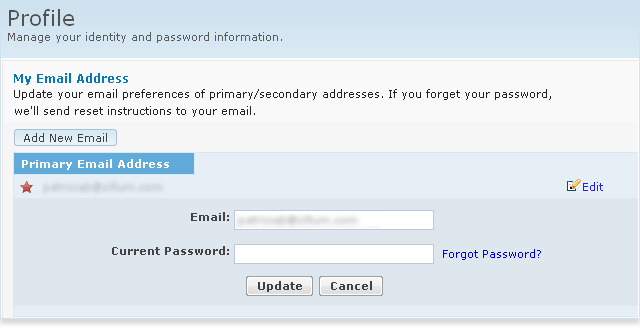
9. How to change my e-mail address in Zoho BugTracker?
To change the email address :
- Login into http://accounts.zoho.com
- Click Email Address option
- Click Edit button and update your email id
10. Can I change the portal owner in Zoho BugTracker?
Yes. You need to be an portal administrator to change the portal owner. Learn More.
11. I was invited to join a portal but could not find the invite mail?
The invite mail is a system generated mail sent from Zoho BugTracker along with username and password. Sometimes this mail would have landed in your SPAM folder . Hence we request you to check your SPAM folder for the invite mail
If you are not able to trace the mail kindly mail to support[at]zohoprojects[dot]com for further assistance.
12. I got an invite mail but project portal denies access for me?
The portal owner who invited you to their portal would have forgot to add you as part of their project, hence access is denied for you. To get an access, you need to request your portal owner to add you as a member in their project.