1099 in Zoho Books
Setting Up 1099 in Zoho Books
To track payments made to your vendors for 1099:
- Go to the Vendors module under Purchases on the left sidebar in your Zoho Books account.
- Select the vendor for whom you want to track the 1099 payments.
- Click Edit on top of the preview screen on the right side.

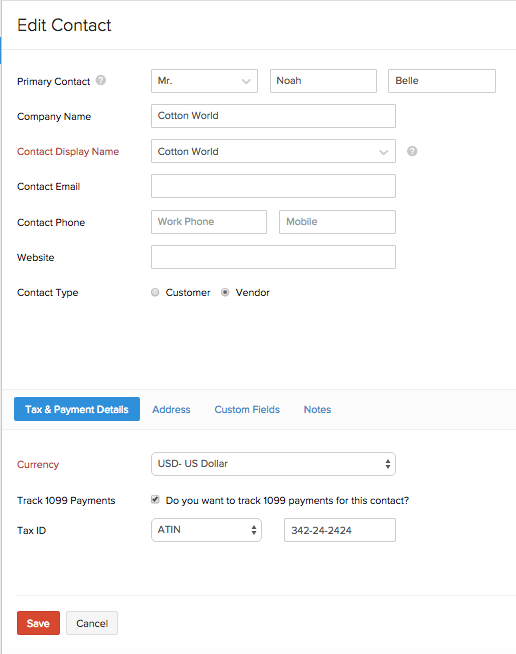
- In the Edit Vendor screen, scroll down to the bottom of the page to find the ‘Do you want to track 1099 payments for this contact?’ field.
- On checking the box, the Tax ID field will appear right below. Select from EIN, SSN, ATIN and ITIN tax types and enter tax number of your contact in the exact format that is provided to you.
- Click Save.
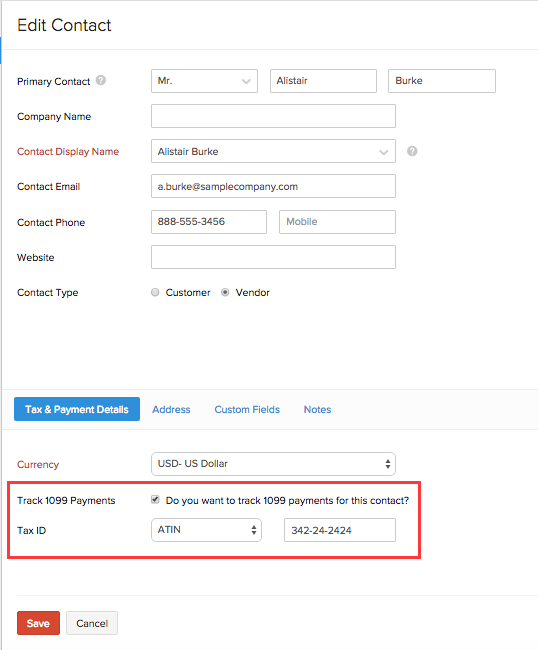
This will ensure that all your 1099 payments made to this contact is tracked.
Generating 1099 Reports
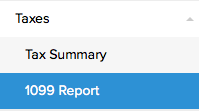
- To generate 1099 report, click on Taxes in Reports. Click on 1099 Report which appears right below.
- On the 1099 Report screen, select the year for which you want to generate 1099 report, in the Reporting Year drop down field.
Note: If you are generating 1099 report for the year 2020 or later, you can select the Reporting Form format for the 1099 report. You can either generate the report in the latest MISC format or in the new NEC format. The Reporting Form format will be selected as the MISC format by default.
- Next, select the Reporting Form if you are generating 1099 during the year 2020 or later.
Note: If you have already generated the report in the old format, you will be able to view the 1099 report in the old format by clicking the View Report in Old Format option.
Warning: Once you generate the 1099 report in the new format, you will no longer be able to view or generate the 1099 report in the old format.
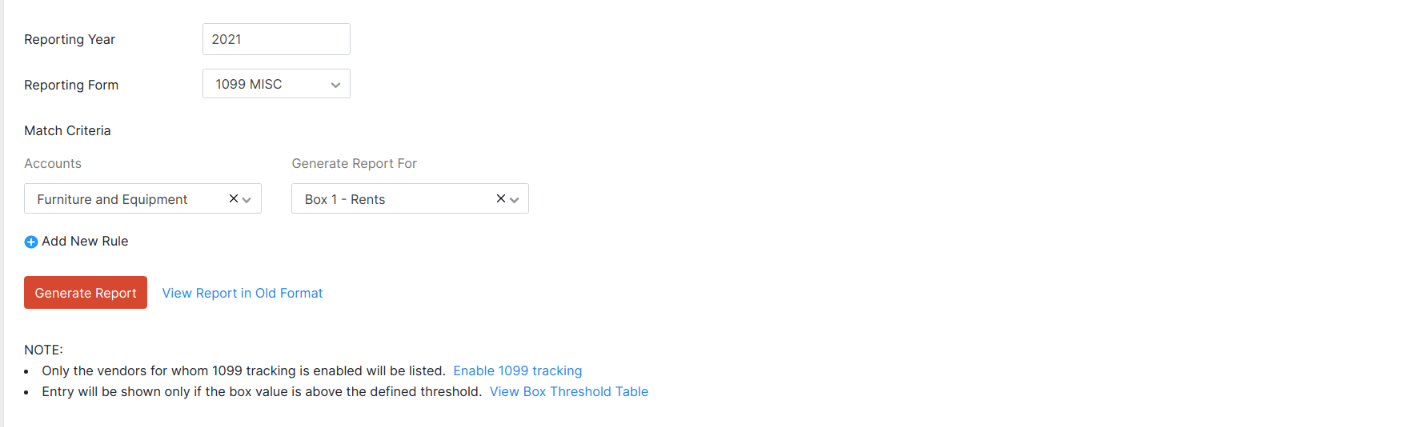
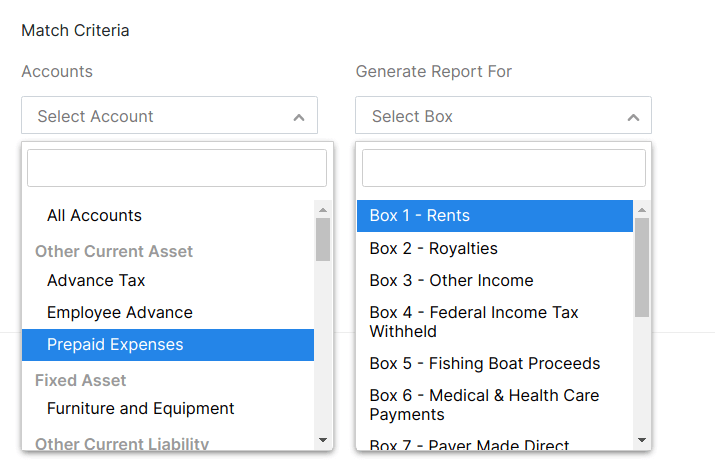
- In the Match Criteria field, choose an account from the Expense Accounts drop down field and match that expense account with the correct box in the Report For drop down field.
- To create multiple rules just as above, click on Add new rule and an additional match criteria field will appear. Repeat the previous step to fill in the information.
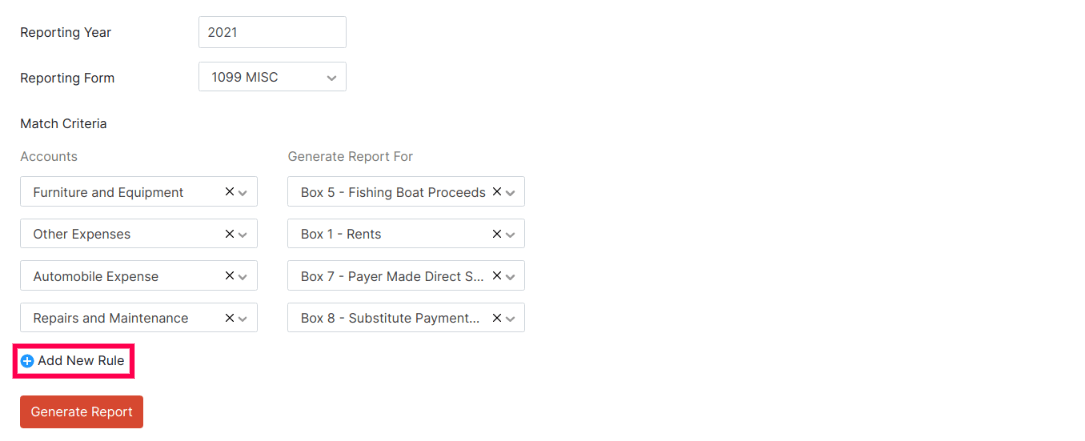
- Once you set up rules, you can click Generate Report button. This will generate a report for those transactions with your contacts for whom you chose to track 1099 payments, for the selected year.
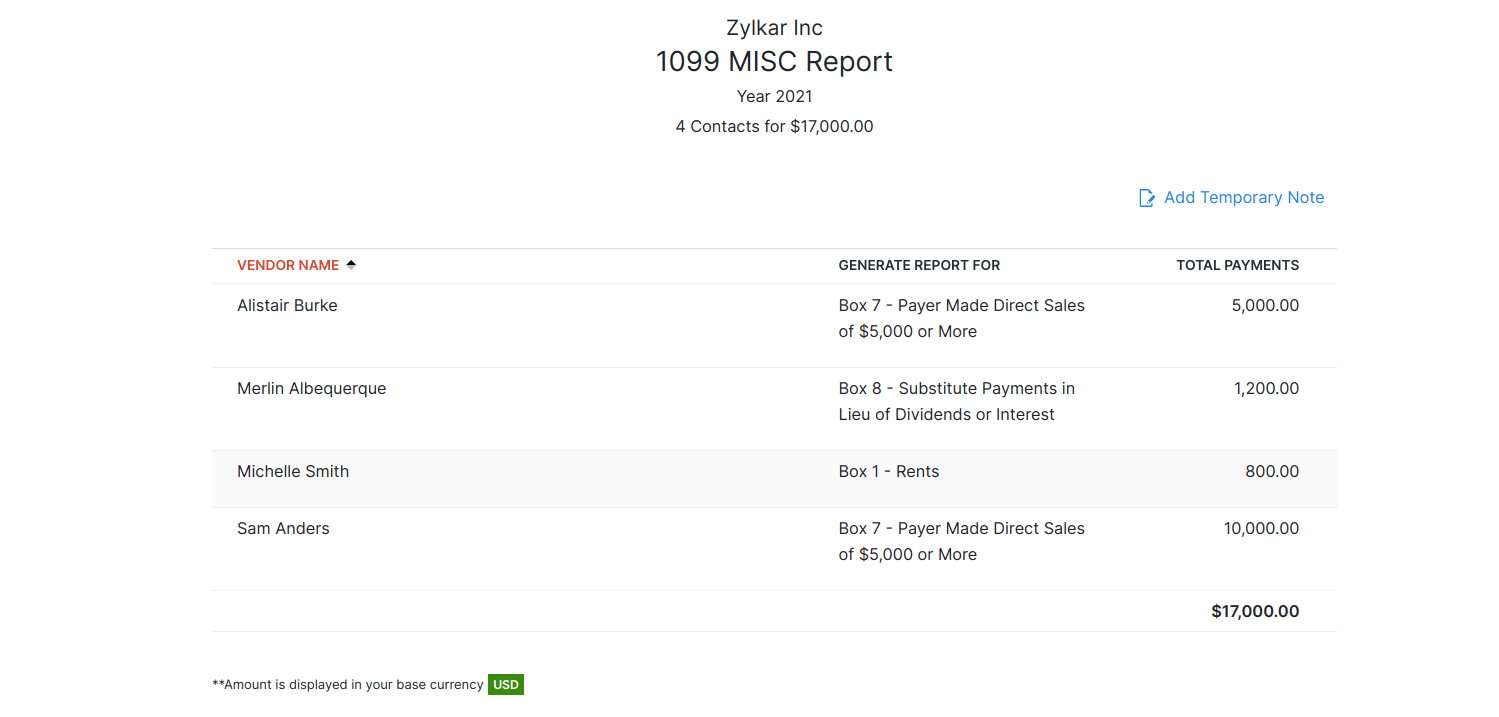
- It reports only those transactions which falls under the threshold limit* of each box.
Please refer to the Threshold Limit Table found below.
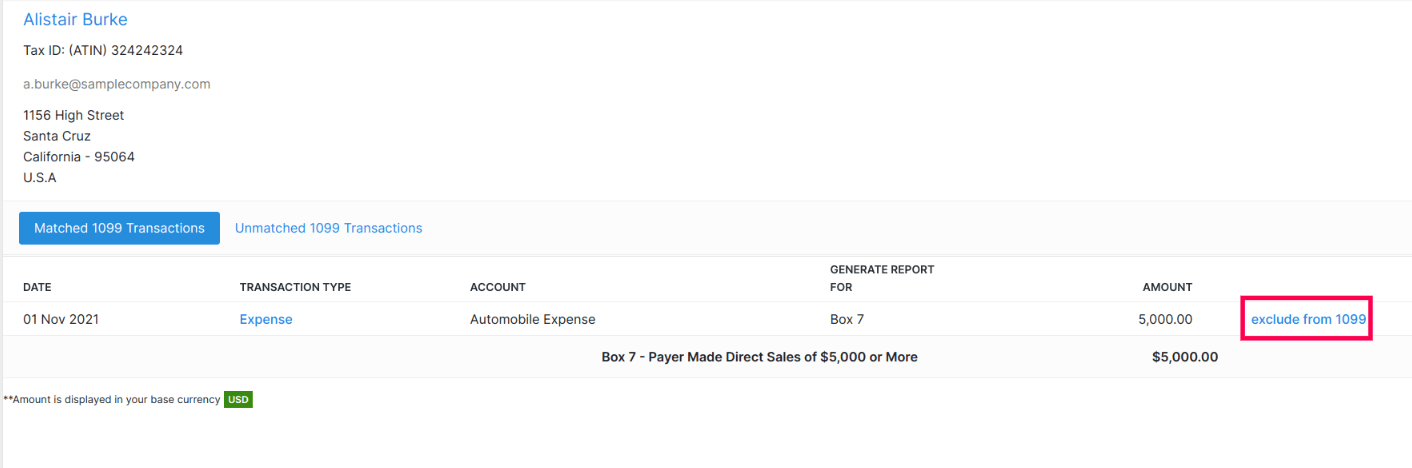
- To view all the 1099 payments made to a particular vendor, click on the vendor’s name and the vendor information screen will appear, as shown in the screen below. As you can see, the contact information and tax number of that particular vendor is displayed on the top left hand side corner of the screen. Right below that, the details of 1099 transactions which are matched are displayed in the Matched 1099 Transactions tab.
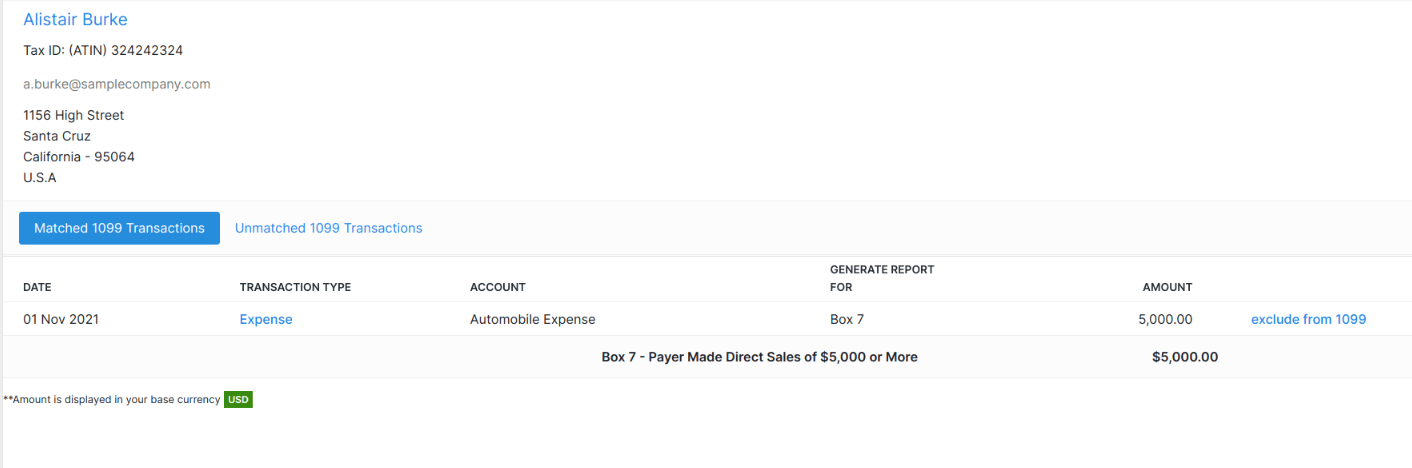
- If you wish to edit the details of the vendor which is displayed on top, you can click on the name of the vendor and an Edit Contact screen will appear. You can make the necessary changes and click Save.
- If you wish to exclude a transaction of a certain vendor from the 1099 report or if you have entered a certain account type in the wrong box, click on the particular vendor. On the transaction line which you want to exclude or edit, click on exclude from 1099 and confirm that you want to exclude the transaction. This will automatically remove the transaction from the Matched 1099 Transactions tab and transfer the transactions to Unmatched 1099 Transactions tab.
- In the Unmatched 1099 Transactions tab, you can see the transaction you excluded. In this tab you can also see those transactions which fall under 1099 payments, but the account type of that specific transaction hasn’t been matched with a specific box. In other words if you haven’t set a rule to match that particular account with any box, those transactions will be found in the Unmatched 1099 Transactions tab. To include the unmatched transaction for which there are no rules set, click on the Select Box drop down field and choose the appropriate Box. Click Save. This will automatically move that transaction to the Matched 1099 Transactions tab.

- In order to include the transaction which you have excluded, into another box, click on include this transaction, which is found on the right hand side of the transaction line. This will automatically provide the Select Box drop down field. Choose the appropriate box and click Save.The included transactions can be found in the Matched 1099 Transactions tab.

Exporting and Printing 1099 Report
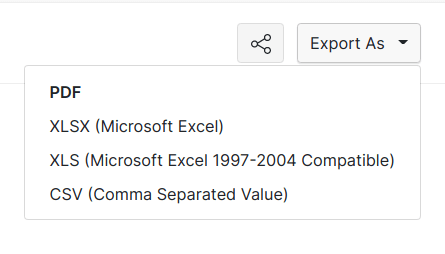
- Once you complete configuring the 1099 Report, to get a copy of the report in csv format, click on Export as CSV button which is found on the top left hand side of the 1099 Reports screen and save the file in your computer. You can also generate a PDF version of the same and print it.
Important points to double check
Ensure that your name, business address and zip code are entered correctly. Please enter the correct tax type and tax number in the exact format that is provided to you, for e.g. if your tax type is EIN then the correct form of entering the EIN tax number would be 00-0000000.
Enter your vendor’s name, business address, tax type and tax number correctly.
Enable 1099 payment tracking through contacts tab and do remember to enter the tax type and tax number which appears right below 1099 payment tracking field. Enter the tax type and tax number of your contact in the exact format that is provided to you.
In case you have transactions in the Unmatched 1099 Transactions tab, you can match that transaction to an appropriate box. But note that after manually matching an unmatched 1099 transaction to a box, if you include a new rule in the 1099 reports tab, this transaction which is matched will be unmatched. So in order to avoid this, ensure that you have set all the rules, before you head to the Unmatched 1099 Transactions tab of each contact, to include any transactions into 1099 reports, manually.
Similarly, if you want to change the amount for a certain 1099 payment in the Expenses or Bills tab after you’ve manually matched a transaction to a certain box, then that transaction will be unmatched. So in this case, after you make the necessary changes to the amount of a certain transaction, please ensure that you include the transactions which is unmatched.
Threshold Limit Table
- Each Box on the report has a threshold limit. Only if this threshold limit criteria is fulfilled, the transactions will be included in the report. Here’s a quick look at the threshold limits for each box in the report.
1099 MISC
| BOX | PAYMENT TYPE | MINIMUM THRESHOLD LIMIT |
|---|---|---|
| Box 1 | Rents | $ 600 |
| Box 2 | Royalties | $ 10 |
| Box 3 | Other Income | $ 600 |
| Box 4 | Federal Income Tax Withheld | $ 0 |
| Box 5 | Fishing Boat Proceeds | $ 600 |
| Box 6 | Medical & Health Care Payments | $ 600 |
| Box 7 | Payer Made Direct Sales of $5000 or More | $ 5000 |
| Box 8 | Substitute Payments in Lieu of Dividends or Interest | $ 10 |
| Box 9 | Crop Insurance Proceeds | $ 600 |
| Box 10 | Gross Proceeds Paid to an Attorney | $ 600 |
| Box 11 | Fish Purchased for Resale | $ 600 |
| Box 13 | Excess Golden Parachute Payments | $ 0 |
1099 NEC
| BOX | PAYMENT TYPE | MINIMUM THRESHOLD LIMIT |
|---|---|---|
| Box 1 | Non-employee Compensation | $ 600 |
| Box 2 | Payer Made Direct Sales of $5000 or More | $ 5000 |
| Box 4 | Federal Income Tax Withheld | $ 0 |
1099 Reporting with Zoho Books
As a business owner in the US, you will be required to send 1099 forms to independent contractors and freelancers whose services you hired for the previous calendar year, as mandated by the IRS.
With Zoho Books you can easily set up and report 1099 in a few simple steps. Zoho Books is integrated with track 1099 and tax 1099 to help you file your taxes online without any hassle.
This page guides you through the following path:
1099 in Zoho Books
Enable 1099 tracking for your contacts, set rules to match account types to a certain box and Zoho Books will take care of the rest. It really is as simple as that! Read more..
Filing with Yearli
Zoho Books is integrated with Yearli. Once you set up and run 1099 reports in Zoho Books, follow these instructions on how to file 1099 using Yearli. Read more.
Filing with Tax1099
Zoho Books is integrated with Tax1099. Set up and run 1099 reports in Zoho Books, file it online on tax1099 using these instructions. Read more.
 Yes
No
Yes
No
 Thank you for your feedback!