Frequently Asked Questions
We encourage you to go through some of the most frequently asked questions about the Zoho Affiliate Program.
Frequently asked questions
- Referrals & Commission
- Links & Promotions
- Payments
- Program Restrictions
- Getting Started
Who can I refer?
You can refer any business that is not an existing Zoho customer under any paid subscription plan.
How much commission can I earn?
For each qualified sale that you generate, you can earn 15% of the revenue Zoho receives from the sale in the subsequent 12 months, provided the referral stays with Zoho for at least 60 days. You will not be eligible to receive a commission for any subsequent purchases of other Zoho services the customer makes.
A qualified sale is the first purchase that your referral has made subject to the following criteria:
- The prospective customer had signed up within 90 days of first clicking on the affiliate link
- A qualified sale is made within 90 days from the date of signing up
- The customer is not an existing paid customer of Zoho
- The customer signs up in the same data center that you are registered in as an affiliate
For example: If your referral who is not a Zoho customer under any paid subscription plan purchases product A and stays with Zoho for 60 days, you'll earn 15% of the revenue Zoho makes from the purchase in the subsequent 12 months. If the referral buys product B next, you'll not receive commissions on product B.
Will I get the commission for all the products that the referred customer goes on to purchase?
No, you will not be eligible to receive a commission for any subsequent purchases (i.e. cross-sell) made by the same customer.
When will I earn commissions? What if the customer cancels their subscription?
You will earn commissions on each qualified sale after the referral completes 60 days as a Zoho customer. The commission will be paid to you based on the plan chosen by the customer.
- If a customer from a qualified sale is subscribed to an annual subscription plan, you will be eligible to receive commission for the whole year.
- If a customer from a qualified sale is subscribed to a monthly subscription plan, you will be eligible to receive a commission on a monthly basis for a period of one year from the date of the qualified sale. Note: If the customer downgrades to a free subscription plan or terminates their subscription within a period of one year, the commission will only accrue until the date the customer cancels or downgrades the subscription.
What happens if my referral downgrades?
- If a customer from a qualified sale in the monthly subscription plan downgrades or terminates their subscription within a period of one year, the commission will only accrue until the date the customer cancels or downgrades the subscription.
- If a customer from qualified sale is in an annual subscription plan, you will be eligible to receive commission for the whole year.
Will I earn recurring commissions for the referred customer?
No. The commission will only be shared on the revenue earned during the first 12 months after the first qualified purchase of any Zoho product via your affiliate link.
Is there a limit on the number of customers?
There is no limit to the number of customers that you can refer. You are encouraged to introduce as many referrals as you can.
Is there a limit on the commission I can earn?
No, there is no limit on the commission that you can earn from the program.
Note: The role of our affiliate is to spread word about Zoho products and get more people to sign up. To properly compensate these efforts, we have capped the highest commission for a single deal at $25000. For example, if your referral's purchase value is $200K, you are eligible only for $25k and not 15% of that deal value.
If you think this provision might impact you reach out to our support via affiliates-support@zohocorp.com.
Is there a minimum sales requirement?
No, however consistent sales can improve your chances of moving up tiers and also earning increased commissions.
How do I track my earnings?
You can log in to your affiliate dashboard at any time for information about any commissions you have earned.
My customer is looking for a discount to purchase the product.
We do not provide any discounts to the customer, but if the customer has purchased the product using your referral link, then each of your qualifying referrals will earn $100 in Zoho Wallet credits in their Zoho account after they sign up, which they can use to purchase any new Zoho app.
What is the benefit for end customers?
- They will be eligible for $100 of Zoho wallet credits.
- The credits can be used to purchase any new product of Zoho and comes with a validity of 30 days.
Where can I find my affiliate link?
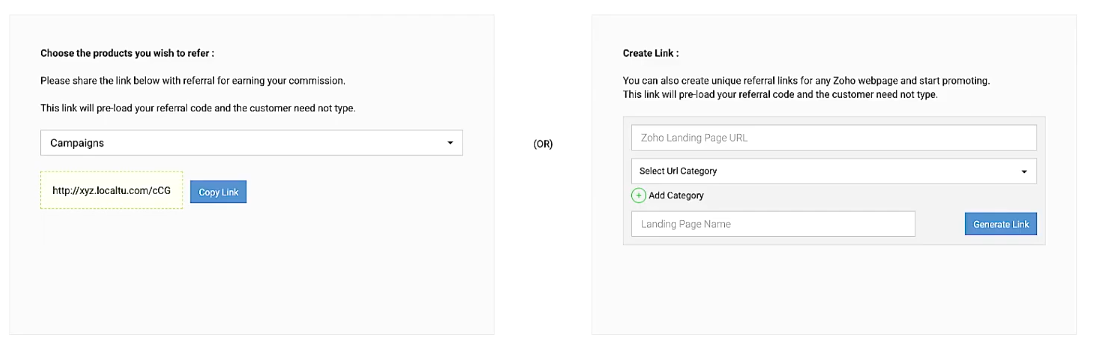
You can find your affiliate link in your affiliate dashboard. Alternatively, you can also generate your deep links for any Zoho webpage using the affiliate URL builder tool in the dashboard.
Can I refer customers in any geography or data center?
The customer must sign up in the same data center that you are registered in as an affiliate. You can, however, refer customers in any data center provided that you have also signed up as an affiliate in that data center. For example, if you sign up in the US data center and want to refer customers from Europe, You can contact our affiliate support and they will be able to assist you.
How long will the signup be attributed to me after the initial click?
Cookies set and used as part of this affiliate program have a generous 90-day validity.
My referral forgot to use my affiliate link. Is there a way to track it back to my account?
We're unable to track referrals back to your account. You are expected to ensure that the referral signs up using your unique link and that you use your affiliate links in all your promotions.
Is there a way for me to track the status of my referrals?
Yes, you can track and monitor the complete referral process in your dashboard.
What happens when my referral signs up from a different data center?
The referral must sign up from your unique URL for you to be eligible to receive an incentive. We currently do not support referrals signing up from a different data center than the person who referred them.
How can I promote Zoho or its products in a better way?
- You can access our affiliate marketing resources to enhance your knowledge about Zoho and its products.
- Use our URL builder tool to quickly generate deep affiliate links for any Zoho web page that you may wish to promote. The generated link is automatically preloaded with your unique tracking parameters.
- You can use your unique referral link on your site's home page, navigation bar, and any other high-traffic areas. Other places where you can place your affiliate links are in your blogs, social media, emails, email signature, or any other relevant promotional material that you create so that once the customer registers using the referral link, you can get the benefit.
- Remember to sell in context and offer meaningful content in the form of original blogs, reviews, ratings, product comparisons, review videos, or any other type of quality content that works for your audience.
- Provide value to others by answering related questions on forums and review sites with helpful responses, and using your referral link in your replies. Please respect the posting rules of any third-party websites.
- Make it easy for your readers to sign up using your links to guarantee their wallet credits and your commission.
I don’t have a blog or website, can I still participate in the Affiliate Program?
Yes. You can still share your affiliate link via email or on social media sites like LinkedIn, Twitter, Facebook etc. You can also participate in online forums, groups, and communities.
Can I reproduce Zoho's content?
You are prohibited from reproducing, in whole or in part, any marketing or promotional material, videos, webinars, case studies, testimonials, or user manuals created by Zoho as your own.
What is the FTC affiliate disclosure?
The Federal Trade Commission (FTC) requires affiliate marketers to disclose that they are getting paid to promote the product. This is to keep transparency and honesty in advertising, and to keep consumers informed. To learn about FTC disclosure requirements, please check out the FTC’s Dot Com Disclosures Guidelines and the Endorsement Guidelines.
Am I required to disclose my affiliate relationship in my promotional efforts?
Yes. Some examples of FTC disclosure statements that you may use are:
- If you make a purchase through this link, we may receive a commission.
- We may earn a referral fee for some of the services we recommend on this post/website.
- We may receive a commission if you click on some of the links on this website and make a purchase at no additional cost to you.

What is the preferred mode of payment?
Wire transfer and PayPal are the preferred mode of payments
When will I get paid?
If the unpaid commissions reflected in your account equals or exceeds $100 you can request a payout. Once you initiate the payment, it takes 15 days to reflect in your bank account.
Can an affiliate choose to receive payouts in other countries' currencies?
Affiliate payouts are decided by the customer's mode of payment. For example, if an affiliate is from Europe and their referred customer makes a purchase using US dollars, then the affiliate will automatically receive their incentive in US dollars.
Exception: For INR, the above possibility is not applicable.
Can I receive payment for customers I have referred before I was onboarded as an affiliate?
No. You are only eligible to receive payment for referrals who sign up using your unique link.
Who is not eligible to participate in this program?
If you are an existing reseller, platform partner, or consulting partner with Zoho, you cannot apply for this program.
Can I be an Affiliate as well as a Consulting Partner simultaneously?
No. The Zoho Affiliate Program and Zoho Partner Program are two independent programs. One cannot be an affiliate as well as a consulting or reseller partner simultaneously.
Affiliates Consulting Partner Eligible for Affiliate Program Affiliate commission Affiliate program support Affiliate tools & resources Pre-recorded product demos Complimentary License Training Certification Post-sale technical support, installation, deployment Pre-sale deal support Consultation support Implementation support Are affiliates expected to provide consultation and implementation?
Affiliates are only expected to promote Zoho and its products. Consulting and implementation support are beyond the scope of the Affiliate Program.
Can I sign up using my affiliate link?
No. It is strictly prohibited.
I want to manage the customer account. Can I get the customer’s login credentials?
No. You will not be able to manage the customer’s account from your end. The customer can reach out to our dedicated support team for any assistance.
How do I get started?
If you are interested, please Sign up here.
How do I access my affiliate dashboard once my application is approved?
Please login to the affiliate portal using your email ID
Does it cost me anything to become an affiliate?
The program is free to join. There are no monthly charges.
I cannot find my welcome email.
Please check your Promotions tab, or your spam folders, first. If you still cannot find it, contact us at affiliates-support@zohocorp.com
Last update on 22-07-2020